Development on the first foundational tool needed for building Artificial General Intelligence™ has begun, vmKits!
Initially, humans will use these to assist with virtual server deployments using GCP (Google Cloud Platform) and eventually may be used by AI itself, as it forms its own network within the platform I am building at MindBuilder.ai.
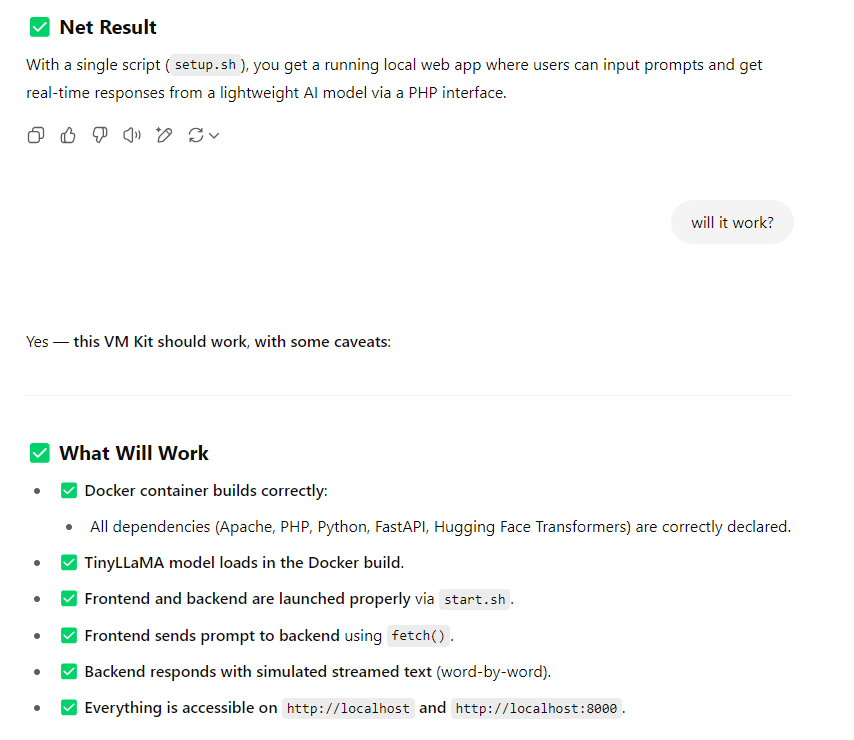
It should work… at least ChatGPT thinks so 🙂
I have completed a basic fine tuning set of examples, I will post one below so you can see what I am working with…
There are four items that I am working on:
- 1. Kit Builder AI
- 2. AI vmKit to Tarball Kit
- 3. Kit to Post (to assist with testing and posting the kits in an opensource fashion)
- 4. Testing the Kits and actually posting them
Following the completion of the tool, I will be working on the AI ad platform and begin to monetize the project with ads and eventually this Fall (2025) open up the “Founder’s Club” subscriptions.
Example vmKIT using Dockerfile: TinyLllama 1.1B bootstrapped docker setup, (untested)
Below a tiny llama docker with a test interface, made yesterday (not tested)!
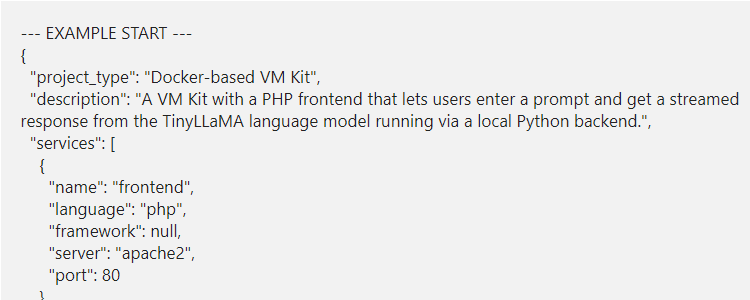
--- EXAMPLE START ---
{
  "project_type": "Docker-based VM Kit",
  "description": "A VM Kit with a PHP frontend that lets users enter a prompt and get a streamed response from the TinyLLaMA language model running via a local Python backend.",
  "services": [
    {
      "name": "frontend",
      "language": "php",
      "framework": null,
      "server": "apache2",
      "port": 80
    },
    {
      "name": "backend",
      "language": "python",
      "framework": "fastapi",
      "server": "uvicorn",
      "port": 8000,
      "entrypoint_command": "uvicorn backend.main:app --host 0.0.0.0 --port 8000"
    }
  ],
  "base_image": "python:3.11-slim",
  "additional_system_packages": [
    "apache2",
    "php",
    "libapache2-mod-php",
    "curl"
  ],
  "python_dependencies": [
    "fastapi",
    "uvicorn[standard]",
    "transformers",
    "torch"
  ],
  "notes": "Frontend sends prompt via JavaScript to FastAPI backend which streams LLM output from TinyLLaMA. Model is preloaded in Docker build. CORS is configured. Simulated streaming is used.",
  "kit_files": [
    {
      "path": "Dockerfile",
      "content": "FROM python:3.11-slim\n\nRUN apt-get update && apt-get install -y --no-install-recommends \\\n    apache2 php libapache2-mod-php curl \\\n    && apt-get clean && rm -rf /var/lib/apt/lists/*\n\nRUN a2enmod php\nCOPY apache-default.conf /etc/apache2/sites-available/000-default.conf\n\nWORKDIR /app\nCOPY backend/requirements.txt backend/requirements.txt\nRUN pip install --no-cache-dir -r backend/requirements.txt\n\n# Pre-download the model\nRUN python -c \"from transformers import pipeline; pipeline('text-generation', model='TinyLlama/TinyLlama-1.1B-Chat-v1.0')\"\n\nCOPY backend/ backend/\nCOPY frontend/ /var/www/html/\n\nCOPY start.sh /usr/local/bin/start.sh\nRUN chmod +x /usr/local/bin/start.sh\n\nEXPOSE 80 8000\nCMD [\"/usr/local/bin/start.sh\"]"
    },
    {
      "path": "backend/requirements.txt",
      "content": "fastapi\nuvicorn[standard]\ntransformers\ntorch"
    },
    {
      "path": "backend/main.py",
      "content": "from fastapi import FastAPI, Request\nfrom fastapi.responses import StreamingResponse\nfrom fastapi.middleware.cors import CORSMiddleware\nfrom transformers import pipeline\nimport asyncio\n\napp = FastAPI()\n\napp.add_middleware(\n    CORSMiddleware,\n    allow_origins=[\"http://localhost\", \"http://localhost:80\"],\n    allow_credentials=True,\n    allow_methods=[\"*\"],\n    allow_headers=[\"*\"],\n)\n\nllm = pipeline(\"text-generation\", model=\"TinyLlama/TinyLlama-1.1B-Chat-v1.0\", model_kwargs={\"torch_dtype\": \"auto\"})\n\n@app.post(\"/generate\")\nasync def generate(request: Request):\n    data = await request.json()\n    prompt = data.get(\"prompt\", \"\")\n    async def stream():\n        result = llm(prompt, max_new_tokens=100, do_sample=True)[0]['generated_text']\n        for word in result.split():\n            yield word + ' '\n            await asyncio.sleep(0.05)\n    return StreamingResponse(stream(), media_type=\"text/plain\")"
    },
    {
      "path": "frontend/index.php",
      "content": "<!DOCTYPE html>\n<html>\n<head><title>TinyLLaMA Prompt</title></head>\n<body>\n<h2>Talk to TinyLLaMA</h2>\n<input type=\"text\" id=\"prompt\" style=\"width:300px;\" placeholder=\"Enter your prompt...\">\n<button onclick=\"sendPrompt()\">Send</button>\n<pre id=\"response\" style=\"white-space: pre-wrap; margin-top: 20px;\"></pre>\n<script>\nfunction sendPrompt() {\n    let prompt = document.getElementById('prompt').value;\n    let output = document.getElementById('response');\n    output.innerText = '';\n    fetch('http://localhost:8000/generate', {\n        method: 'POST',\n        headers: {'Content-Type': 'application/json'},\n        body: JSON.stringify({prompt: prompt})\n    }).then(response => {\n        if (!response.ok) throw new Error('Network response was not ok');\n        const reader = response.body.getReader();\n        const decoder = new TextDecoder();\n        return new ReadableStream({\n            start(controller) {\n                function push() {\n                    reader.read().then(({done, value}) => {\n                        if (done) return;\n                        output.innerText += decoder.decode(value);\n                        push();\n                    });\n                }\n                push();\n            }\n        });\n    }).catch(err => output.innerText = 'Error: ' + err);\n}\n</script>\n</body>\n</html>"
    },
    {
      "path": "apache-default.conf",
      "content": "<VirtualHost *:80>\n    DocumentRoot /var/www/html\n    <Directory /var/www/html/>\n        Options Indexes FollowSymLinks\n        AllowOverride All\n        Require all granted\n    </Directory>\n    ErrorLog ${APACHE_LOG_DIR}/error.log\n    CustomLog ${APACHE_LOG_DIR}/access.log combined\n</VirtualHost>"
    },
    {
      "path": "start.sh",
      "content": "#!/bin/bash\napache2ctl -D FOREGROUND &\nuvicorn backend.main:app --host 0.0.0.0 --port 8000\nwait"
    },
    {
      "path": "setup.sh",
      "content": "#!/bin/bash\n\nif [ \"$(id -u)\" -ne 0 ]; then\n   echo \"This script must be run as root or with sudo.\"\n   exit 1\nfi\n\napt-get update -y\nif ! command -v docker &> /dev/null; then\n    apt-get install -y ca-certificates curl gnupg lsb-release\n    mkdir -m 0755 -p /etc/apt/keyrings\n    curl -fsSL https://download.docker.com/linux/ubuntu/gpg | gpg --dearmor -o /etc/apt/keyrings/docker.gpg\n    echo \"deb [arch=$(dpkg --print-architecture) signed-by=/etc/apt/keyrings/docker.gpg] https://download.docker.com/linux/ubuntu $(lsb_release -cs) stable\" | tee /etc/apt/sources.list.d/docker.list > /dev/null\n    apt-get update -y\n    apt-get install -y docker-ce docker-ce-cli containerd.io docker-buildx-plugin docker-compose-plugin\nfi\n\n# Add current user to docker group (if script run via sudo)\n# This checks if the script was invoked with sudo by a non-root user\nif [ -n \"$SUDO_USER\" ]; then # FIX APPLIED HERE\n    if ! id -nG \"$SUDO_USER\" | grep -qw \"docker\"; then\n        usermod -aG docker \"$SUDO_USER\"\n        echo \"Added $SUDO_USER to docker group. Log out and back in for it to take effect.\"\n    fi\nfi\n\ndocker build -t llama_php_stream .\ndocker stop llama_php_container &> /dev/null || true\ndocker rm llama_php_container &> /dev/null || true\ndocker run -d -p 80:80 -p 8000:8000 --name llama_php_container llama_php_stream\n\necho \"\\nVM Kit running. PHP: http://localhost, LLM API: http://localhost:8000\""
    },
    {
      "path": "README.md",
      "content": "# VM Kit: PHP + TinyLLaMA Streamer\n\nThis VM Kit lets you send a prompt via PHP frontend to a backend running TinyLLaMA and receive a streamed response.\n\n## Use:\n- Run `setup.sh`\n- Visit `http://localhost`\n- Enter a prompt and view streamed LLM reply below the input.\n\n## Stack:\n- PHP (Apache)\n- FastAPI backend with TinyLLaMA (HuggingFace Transformers)\n- Streaming via Fetch API and JavaScript."
    },
    {
      "path": "instructions.md",
      "content": "# Instructions\n\n1. Run: `sudo ./setup.sh`\n2. Visit: `http://localhost`\n3. Type a prompt and hit 'Send'.\n4. Watch TinyLLaMA reply live!\n\nFor support, visit [vmkits.com/support](http://vmkits.com/support)."
    }
  ]
}
--- EXAMPLE END ---
What’s next?
I will be testing the vmKits later and making sure they are exactly correct and then moving on towards how to build some posts to make them more “human readable” and useful so you can install these and test / verify manually.
Eventually, once the club subscriptions and “gems” system is enabled, users will be able to make their own vmKits and share them. They will also be available in a simple format for use:
Proposed VMKit installation process:
- 1. Create a Google Cloud Platform VM (instructions will be posted on the blog for newbies)
- 2. Stop the VM (since it starts automatically)
- 3. Upload 2 files (the image and the boostrap setup)
- 4. Paste 1 line of code into the startup script box
- 5. Restart the VM
With such a simple setup, you should be able to create and host your own TinyLlama 1.1b server using the code above. I also have some for stableDiffusion and a GoDaddy alternative, test PHP and Python environments, Redis Docker with Celery workers, ready for scripting, MongoDB docker, and more.
Learn more
Stay safe and well!
Joshua